📱 Android app · Localio

AI video translator & dubbing on Android

Transcribe, translate, and dub videos in 50+ languages from your phone. Natural AI voices synced to the original timing — start a project on Android, finish it on desktop.
🌍 50+ languages ✨ Start free 🔄 Sync with desktop

Start on your phone, finish on desktop

Localio is the Android app for videodubbing.com. Sign in with the same account — projects, subtitles, and edits live in the cloud so you can upload on the go and polish in the full web studio whenever you need a bigger screen.

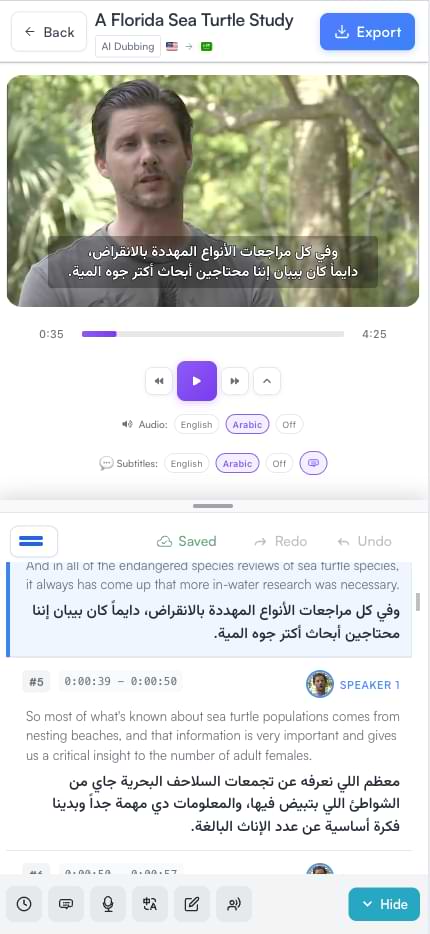
Localio subtitle editor preview on mobile

Everything you need to localize video

The same AI pipeline creators use on the web — transcription, translation, dubbing, editing, and export — built for Android.

Auto-subtitles

Upload a video and get accurate, timestamped subtitles with word-level timing. Supports 50+ languages for transcription and captions.

AI translation

Translate subtitles into any supported language while preserving the speaker's intent, tone, and context — then review before you dub or export.

AI dubbing

Replace original audio with natural-sounding voiceovers synced to the video. Multi-speaker workflows and timing-matched voices for interviews, tutorials, and social content.

Built-in subtitle editor

Fine-tune every word, timing, and translation before you export. Open the same project on desktop when you need a larger editing surface.

Flexible export

Download subtitles as SRT or WebVTT, or burn captions into the video. Share dubbed audio and multilingual masters for YouTube, TikTok, and training content.

Cross-device sync

One account for the Android app and app.videodubbing.com. Start mobile, continue on the web — no file juggling.

AI narration from script

Paste a script and generate spoken audio with AI voices — ideal for podcasts, courses, and voiceovers. Learn more about AI narration.

From upload to multilingual video in four steps

Typical projects finish in under 30 minutes — no specialised software required.

Upload on Android

Open Localio, sign in, and upload a video from your phone — or paste a link when supported.

Choose languages

Pick source and target languages from 50+ options. Choose subtitles only, translate, or full AI dubbing.

AI processes in the cloud

Localio transcribes, translates, and generates dubbed audio with voices matched to dialogue timing.

Review, edit & export

Tweak text and timing in the editor, continue on desktop if you prefer, then export SRT, VTT, or a finished video.
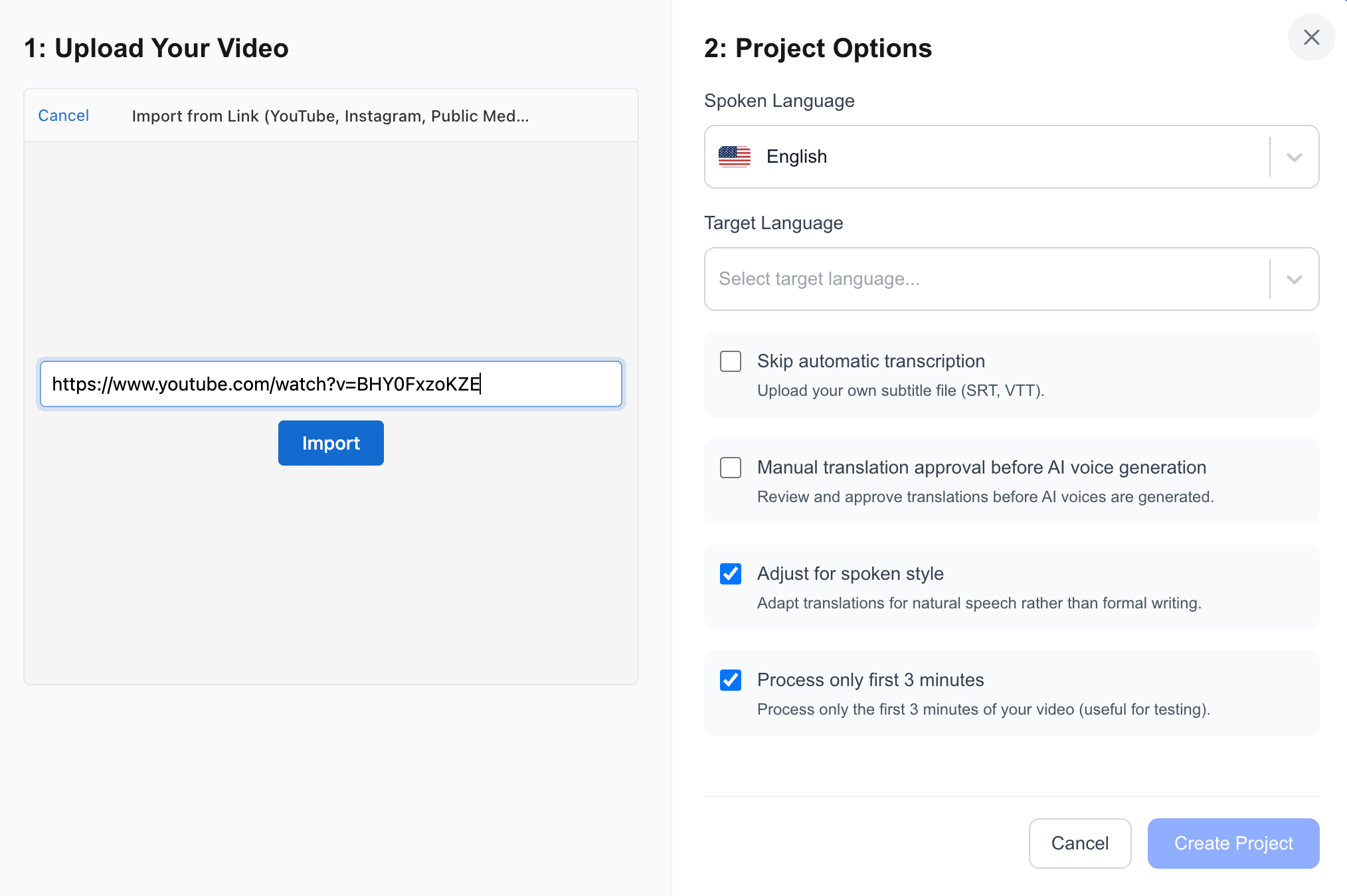
Upload video step in Localio video dubbing workflow

Start free — no credit card

Download Localio and try AI subtitles, translation, and dubbing with limited free credits. Paid plans start at £29/month for 100 minutes of dubbing. Credits work the same on Android and the web.

See plans & pricing

Localio Android — Frequently Asked Questions

Is Localio free on Android?
Yes. Download Localio free on Google Play and start with limited credits — no credit card required. Paid plans start at £29/month for 100 minutes of dubbing. See all plans for full details.
Is it the same account as the website?
Yes. Sign in with the same email on the Android app and at app.videodubbing.com. Projects, subtitles, and edits sync in the cloud so you can start on your phone and finish on desktop.
What can I do in the Android app vs the web studio?
The Android app lets you upload videos, create subtitles, translate, dub, edit, and export on the go. The web studio offers the same cloud workspace with a larger editor surface — ideal for fine-tuning. Both use the same account and project library.
Which languages and export formats are supported?
Localio supports 50+ languages for transcription, translation, and dubbing. Export subtitles as SRT or WebVTT, or burn captions into the video. See the full list on our supported languages page.
How long does AI processing take?
Most projects finish in under 30 minutes. A typical 10-minute video often completes transcription, translation, and dubbing in about 15–30 minutes, depending on length and selected languages.
How do I delete my account and data?
You can request full account and data deletion at any time from app.videodubbing.com/delete-my-account. See our Privacy Policy for how we handle your videos and data.

Get it on Google Play · Video translator · Contact

📱 Available on Google Play
Download Localio for Android
AI subtitles, translation, and dubbing in your pocket — same account as the web studio.
Free to start · Same account on web and app · Privacy Policy