AI speech transcription with speaker diarization
Word-level timestamps and automatic speaker separation — even on overlapping dialogue in interviews and multi-host formats.
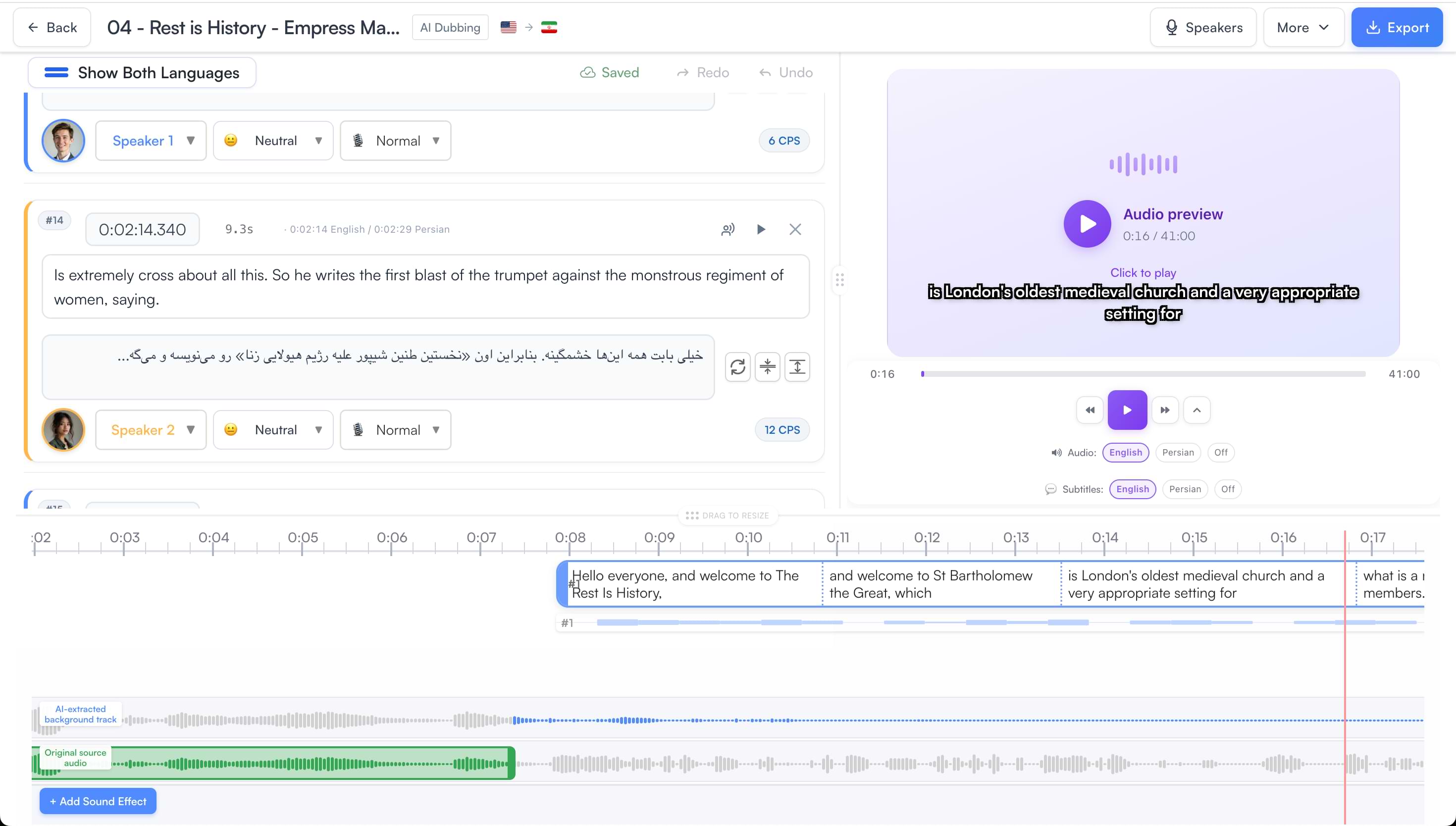
One workspace from upload to dubbed master. The bilingual segment editor, live audio preview, and multi-track timeline let you review AI output and make any corrections before you export — no external tools needed.
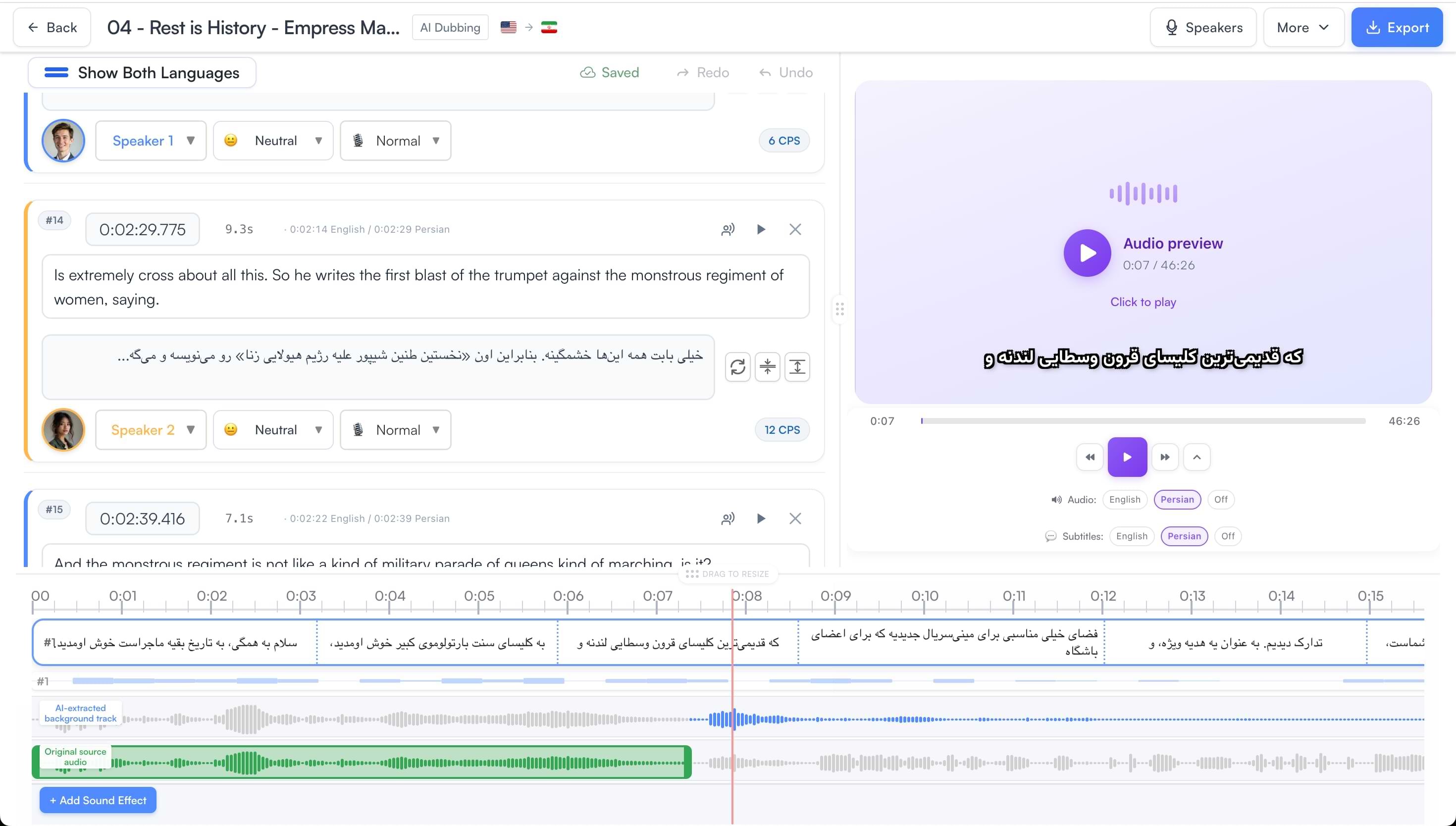
The full AI dubbing cycle runs automatically — transcription, translation, and voiceover generation — then hands you a visual editor for any fine-tuning before export.
Upload MP3, WAV, or M4A directly, or import from Dropbox or Google Drive. Video podcasts (MP4, MOV) are also supported.
Select from 50+ languages and regional variants — Australian English, Brazilian Portuguese, Egyptian Arabic, and more.
Speaker diarization separates voices, context-aware translation preserves meaning and tone, and natural AI voiceovers are generated to match the original timing.
Assign voices, correct translations, adjust timing, and preview the dubbed audio against the original — all in a single bilingual editor.
Export dubbed audio or video and publish to Spotify, Apple Podcasts, YouTube, or any RSS platform.
AI does the heavy lifting. Then you decide: which voice fits each speaker, which lines need a timing tweak, and whether a segment needs to be regenerated. Every decision is yours.
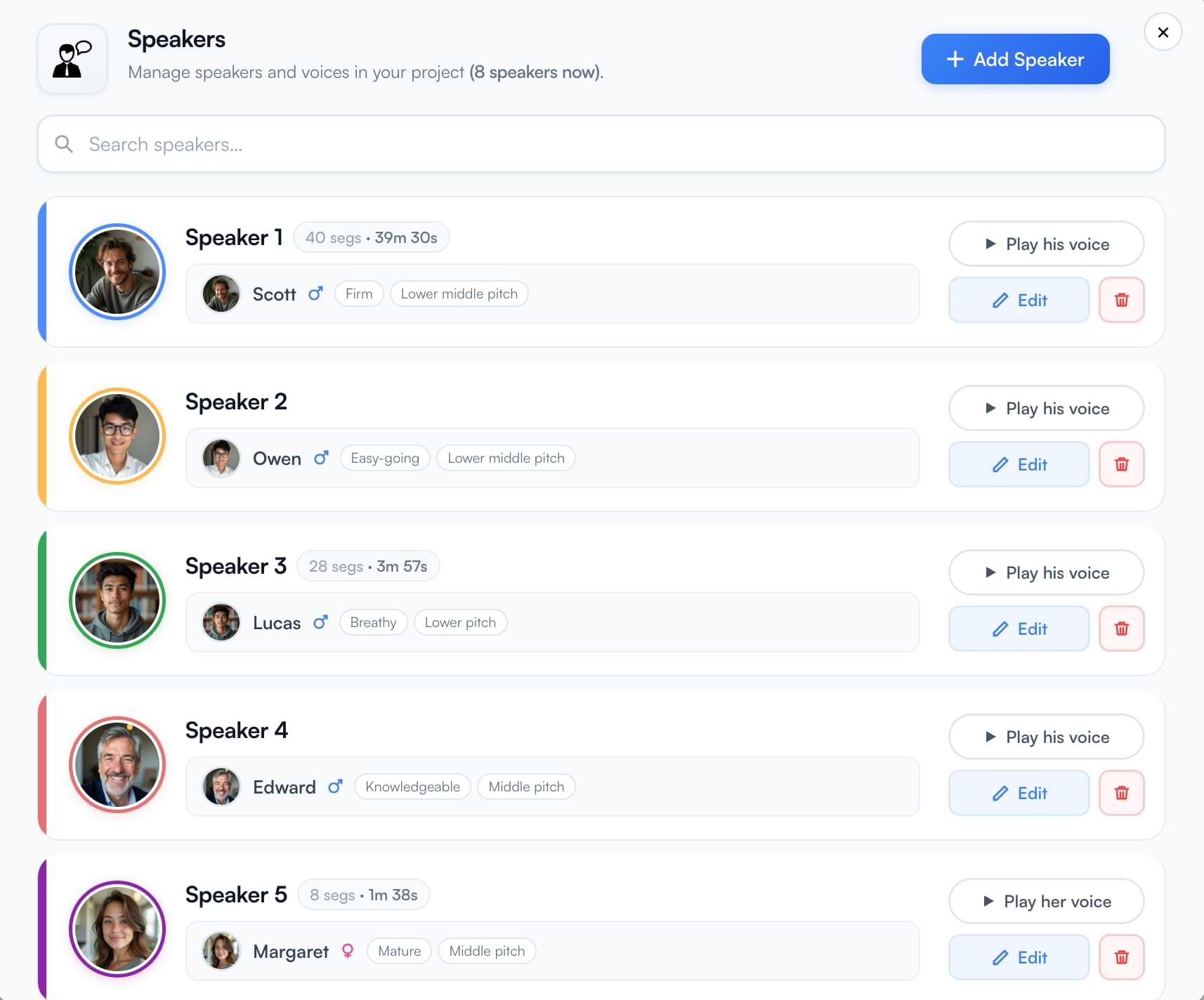
The AI automatically identifies each speaker in your podcast through diarization. Every speaker gets their own card showing total segment count and cumulative duration — so you can see at a glance who speaks how much.
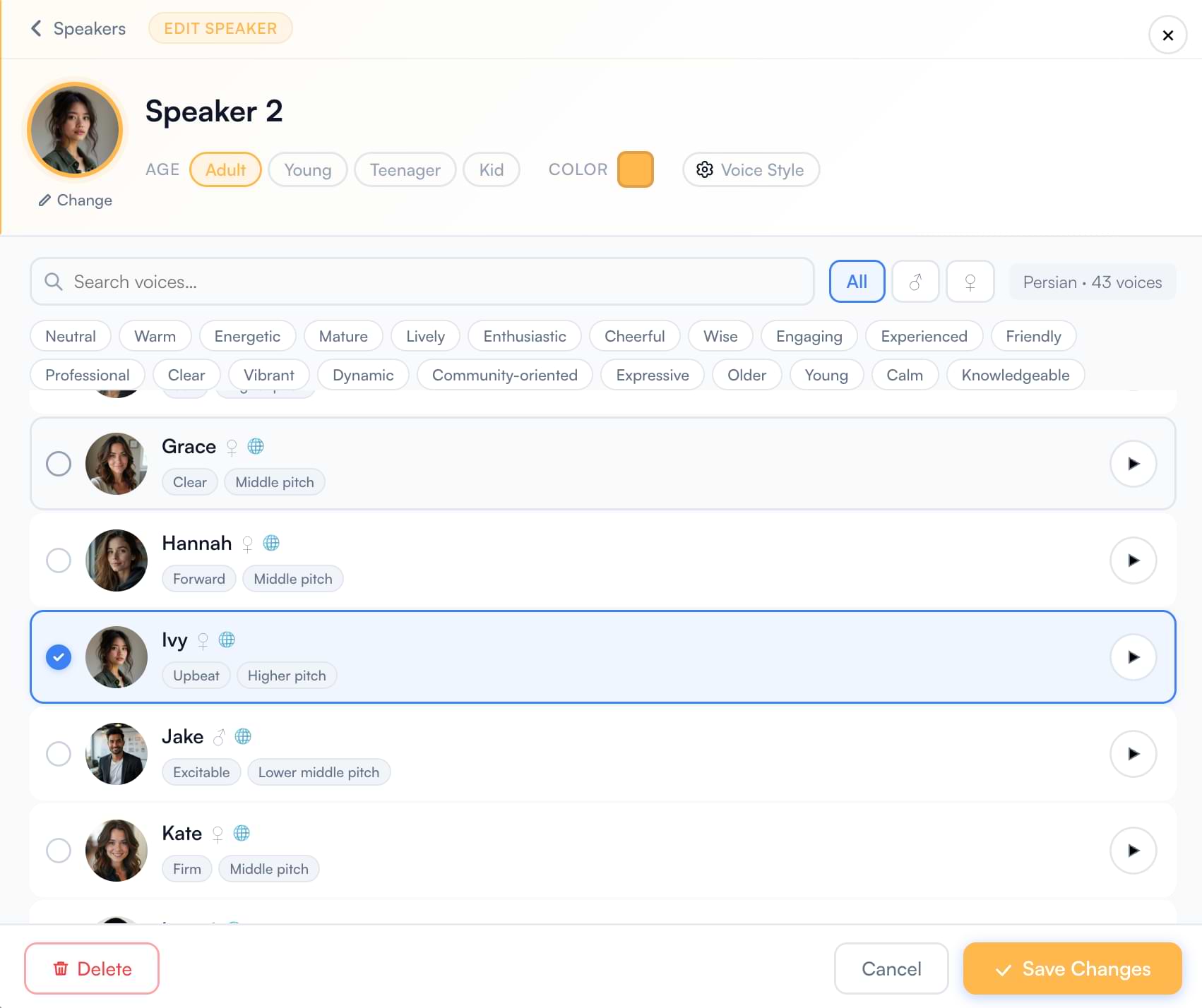
A voice library filtered to your target language gives you a curated set of voices matched to accent and dialect. Refine by gender, age group, and tone tags to find the perfect fit for each speaker.
The multi-track timeline gives you a full view of the episode: transcript segments on top, original source audio, and the AI-extracted background track below. Dubbed audio slots exactly where the original speech was.
Add sponsor spots at pre-roll, mid-roll, or post-roll — using an AI voice or your own pre-recorded audio. Works in podcast translation and AI Narration projects.
Add a segment with your ad script, pick any AI voice — host-read or a distinct sponsor voice — generate the audio, and place it at the exact timestamp you want.
Drop in your own MP3 or WAV ad read or produced spot and position it precisely on the timeline. Drag to adjust placement and duration before export.
A complete dubbing platform built for audio-first workflows — from diarization and translation to per-speaker voice assignment and final mix.
Word-level timestamps and automatic speaker separation — even on overlapping dialogue in interviews and multi-host formats.
Translation that preserves the conversational register, cultural references, and emotional tone of the original — not a literal word-for-word render.
Go beyond language — choose regional variants like Australian English, Brazilian Portuguese, or Egyptian Arabic so the dubbed voice sounds natural to your target audience.
Search a voice library filtered to your target language, audition voices with a click, and assign a distinct voice to every speaker in the episode.
The AI separates speech from background audio into independent tracks. Intro music, ambient sound, and sound effects are preserved and mixed with the dubbed voices in the final output.
Edit any translation, drag to adjust segment timing, regenerate individual lines with different voice or emotion settings — full editorial control without reprocessing the entire episode.
Insert sponsor spots with an AI-generated read or upload your own pre-recorded ad audio and place it anywhere on the timeline — pre-roll, mid-roll, or post-roll.
Upload your podcast audio (MP3, WAV, M4A) to videodubbing.com. Select your target language and accent — for example, English with an Australian accent, or Spanish (Latin American). The AI transcribes, translates, and generates natural voiceovers. Review and fine-tune in the visual editor, then export dubbed audio for distribution on Spotify, Apple Podcasts, or YouTube.
Yes. When you select a target language you can also choose a regional variant — Australian English, British English, Brazilian Portuguese, European Portuguese, Latin American Spanish, Egyptian Arabic, and more. Each variant uses voices with natural regional intonation. See the full list at videodubbing.com/supported-languages/.
The AI automatically identifies and separates speakers through diarization. Each speaker appears as a distinct speaker card in the editor showing their segment count and total duration. You assign a separate AI voice to each speaker, then preview the full episode before export. This preserves the dynamic of interviews and co-hosted shows in the dubbed version.
Yes. The visual editor shows original and translated text side by side for every segment. You can correct translations, adjust segment start and end times, and use the CPS (characters per second) indicator to ensure dubbed lines fit within their time window. You can also regenerate individual segments with different voice settings without reprocessing the whole episode.
Yes. The AI separates speech from background audio — music, ambient sounds, and sound effects — into distinct tracks on the timeline. The background track is preserved and mixed with the dubbed voiceovers in the final export, so the atmosphere of the original episode is maintained.
Yes. Video podcasts (e.g. YouTube podcasts recorded as MP4 or MOV) are fully supported. Upload the video file, select your target language and accent, and the same full AI dubbing workflow applies. Export a dubbed video file ready for YouTube or other platforms.
For audio-only podcasts: MP3, WAV, M4A, and all major audio formats. For video podcasts: MP4, MOV, AVI. You can also import files from Dropbox or Google Drive. Export dubbed audio as MP3 or WAV for Spotify, Apple Podcasts, YouTube, and other platforms.
The Creator plan is £29/month and includes 100 minutes of AI dubbing. A 60-minute episode uses 60 minutes of quota. Translated subtitles cost 50% per minute; captions 30% per minute. Most episodes are ready in 15–30 minutes. Works with Dropbox and Google Drive. See full pricing.
Most 60-minute episodes are ready in 15–30 minutes. The AI handles transcription, speaker diarization, translation, and voiceover generation automatically. You can then spend as much or as little time as you like fine-tuning in the editor before exporting.
Yes. In the timeline editor you can add an AI-read sponsor spot by inserting a segment with your ad script and generating it with any voice, or upload a pre-recorded MP3 or WAV ad and place it at pre-roll, mid-roll, or post-roll. Drag to adjust placement before export.